


Last year, along with iOS 18, Apple tried to shake up the photo app by streamlining its photo app. They put everything under one view and for most people it was a flop. Instead of making navigating easier, it was even more boring to actually use it. It really felt like nothing had a place of its own, everything was just on endless pages. Apple heard us and seems to have changed the look and feel of the Photos app using iOS 26, and I think they nailed it. They took the best part of the old design, layered on some new looks and features of iOS 26. Now there is the best version of the photo app we’ve seen. Here are some of the best features you should know!
Check out the detailed walkthrough. This covers everything the Photos app offers below.
Now let’s go into some of the best features and changes the iOS 26 Photos app can do.
Simplified navigation
As mentioned above, the changes that Apple made to the Photos app on iOS 18 actually complicated the app intended to be simple. But they went back to a streamlined, simple layout with two main tabs: libraries and collections. When you open the app, you will be greeted by your Photo Library in the latest photos chronological order. That’s exactly how I want to see my photo library. Next, if you want to get features and categories for all remaining Photos apps, there is a tab option in the bottom left where you can toggle between the Library and Collections section. The Collections section allows you to pin and see what you need to find in the Photos app, such as photos, albums, utilities.
This layout is much easier to navigate, use, and even experience. It makes much more sense and there is less friction when finding what you need and want. A little bonus tip: There is a search button at the bottom right. It’s light-year better than before so I recommend giving it a try!

Space scene
This is a lot of fun and perhaps my favorite new feature in the iOS 26 Photos app. It is not possible to watch the video, so I highly recommend watching it. You need to watch it in the video. But basically what this does is to add a 3D effect to any image in the photo library that has subjects.
This is a new or old photo from an iPhone or another camera. As far as you can see the small hexagonal button at the top right of the photo, you can convert it into a spatial scene. Pressing it will harvest the image a little and pull the subject forward. When you move your phone, the background moves on the phone, but the subject remains on. It creates this amazing, immersive photo that brings it to life. The biggest part of this is that it is not an exclusive feature of Apple Intelligence. You need to install iOS 26 and it works on iPhone 12 and above!

Event recognition
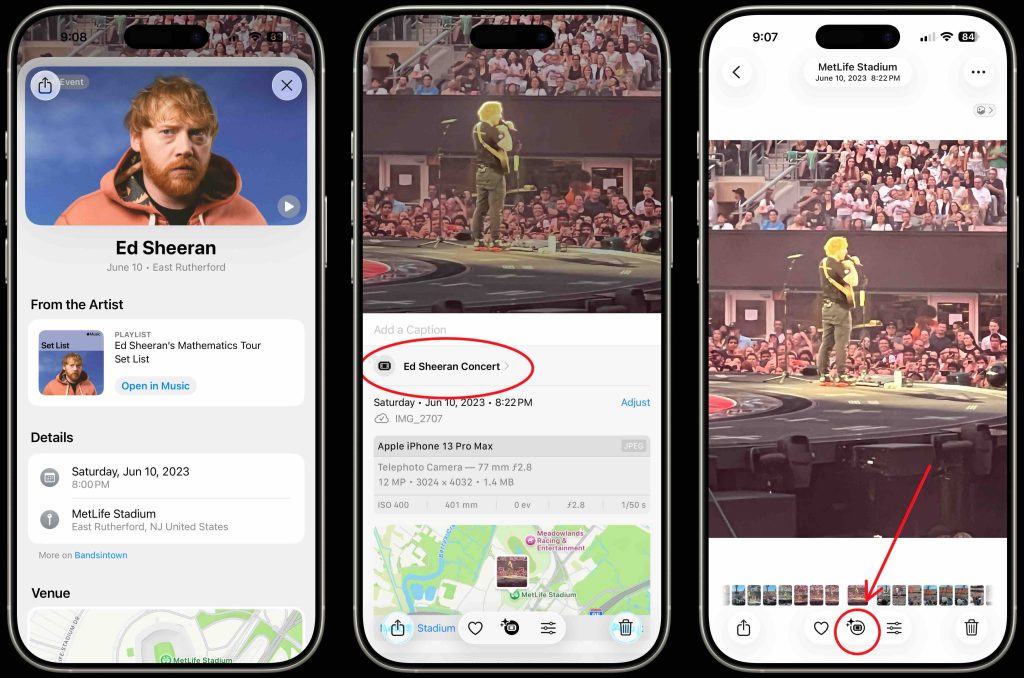
This is one of the features that really confuses you as it gets a lot of information from one image. This works by using all the metadata from the images we took to put together the event recognition experience. For example, I attended an Ed Sheeran concert at MetLife Stadium a year ago. I went and found a blurry photo that had it (using the improved search feature I entered into Ed Sheeran and took me to all the photos of the concert). When I pulled up the photo, a small ticket icon appears at the bottom, indicating that the iPhone was aware of this. If you tap there you know it’s an Ed Sheeran concert. This is because the location, date, time and everything else is using all the metadata collected in the backend. You can then tap again to get more information such as the artist, tour dates, Apple Music Songs, and more about the concert itself. It’s a really cool feature.
Your experience may be different. Currently, this feature only works in large venues, but I am sure it will work over time at more local and smaller events. Anyway, it’s a great feature and a great proof of concept.
Final Thoughts
These are just some of the best features added to the Photos app using iOS 26. There are other features I’m doing, some new features, some new ones I’ve done under the radar. iOS 26 photos are simple again, but more intelligent and powerful than ever. And I just scratched the surface. There are many more tricks, including live text, live translations, and types for creating memory. So, check out the video here and let us know what you think!
Best Apple Deals and Accessories
(TagStoTRASSLATE)



