


Apple’s Always On Display has been pretty consistent since its debut with the iPhone 14 Pro. With iOS 26, Apple has quietly changed the way it works in ways that may not be obvious.
Always-on display mode
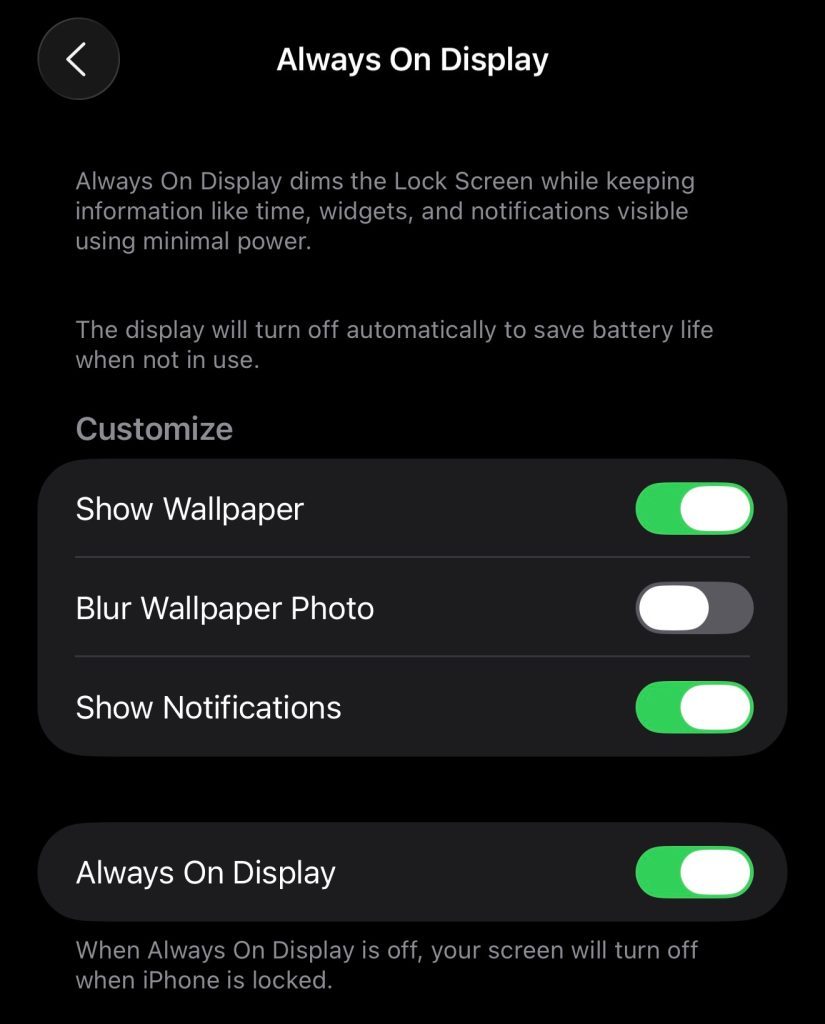
In iOS 26, the system blurs your lock screen wallpaper by default instead of just darkening it. This tweak makes the clock and widgets more prominent, but it also defeats the purpose of displaying photos if you like that feature. Fortunately, there is also a toggle function to revert to the original behavior.
In iOS 18, Always On Display worked the same way as in iOS 26. When your iPhone is locked, a dimmed version of the lock screen remains visible, giving you quick access to essentials like the clock, date, notifications, and widgets. The screen turns off completely when you’re face down, covered, in CarPlay, using Continuous Camera, in low power mode, when Sleep Focus is on, or when you go to bed.
Customization is always limited, but useful. You can decide whether to display wallpaper and whether to display notifications. This means you can keep your always-on screen clean and utility-driven, or keep your wallpaper and lock screen settings personal.
There’s one big change in iOS 26
In iOS 26, wallpapers become blurry by default when the display goes dark. This effect may improve readability, but it changes the appearance of the lock screen. In my case, I’d rather have no wallpaper than see a blurry version of the lock screen image.
Luckily, Apple added a toggle along with the behavior change to give you more control. You can disable the blurry wallpaper in (Settings) > (Display & Brightness) > (Always On) so that your lock screen appears perfectly clear as before.
Which behavior do you prefer? Is blurring better for privacy and confidentiality, or does it defeat the purpose?





